

Detect EMP Pulse
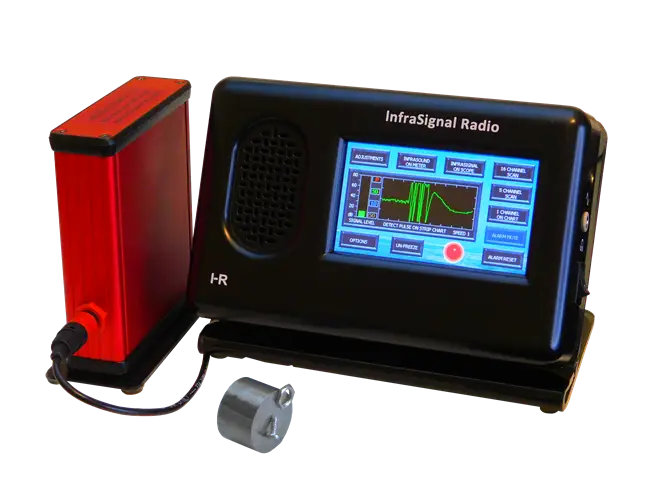
In the picture above we used the magnet to test the system and create the pulses you see on the screen. This was done by passing the magnet across the face of the electromagnetic (EMP) sensor several times to set off the alarm, then quickly pressing the FREEZE screen button before taking the picture.
This is the recommended detection and alarm system for those concerned with EMP such as government agencies, military and preppers. The Select-Alarm is used with the Nuclear & Solar EMP Sensor to detect both sources of EMP.
In this display the strip chart shows a burst of pulses that sounded the alarm immediately when they first appeared on the edge of the screen. Unlike the alarm system setup to monitor for vibrations, the EMP Sensor setup does not require adjustments of the ALARM threshold. The EMP Sensor alarm setup works strictly with a magnetic pulse as seen on the DETECT PULSE ON STRIP CHART screen above.
The EMP Sensor components are housed in an aluminum shield and do not respond to a voltage signal, only a magnetic variation such as a magnetic pulse. The signal level as seen on the SIGNAL LEVEL bar graph on the left side of the LCD screen will always be very low except during a varying and prolonged Electromagnetic Pulse.
SETUP DETAILS: To setup the system to detect a nuclear or solar EMP, go to OPTIONS >> NORMAL AGC >> FAST IMPULSE RESPONSE >> DETECT PULSE buttons. A red-letter P will appear in the CURRENT AGC SETTINGS window. This red-letter P indicates that the Select-Alarm is setup to detect a fast pulse and sound the alarm. Select the DETECT PULSE ON CHART or the INFRASIGNAL ON CHART button. To monitor the system you can also use the INFRASIGNAL ON SCOPE mode. The system is now set up.
When an EMP is detected while using the detect pulse option, it is saved to nonvolatile memory very fast before the system loses AC power. When power is restored, (perhaps with a generator or backup battery) the alarm will sound and show a message that says “A pulse was detected before loss of power. To reset the alarm, go to OPTIONS >> ALARM TEST >> ALARM RESET”. This ensures that you are alerted to a NUCLEAR or SOLAR EMP and power loss, the two events occurring together.
The only way that this alarm condition can be reset, that is, when using the detect pulse option and after power is lost and then restored, is for a person to use the special sequence to reset it (go to OPTIONS >> ALARM TEST >> ALARM RESET). This special reset sequence is designed to prevent younger members of your crew from accidentally resetting it without your knowledge. They can easily mute the alarm sound, but unless they can read, it would be very unlikely they could reset the alarm.
When a less than severe NUCLEAR, SOLAR EMP or LIGHTEN STRIKE occurs and the power is not lost, the alarm will sound until it’s reset. In this case, resetting the alarm is normal and does not require the special sequence.
If a LIGHTEN STRIKE occurs and sets off the Select-Alarm, it will have to be so close that you’ll know about.